SpringWeb报错——CORS问题解决

SpringWeb报错——CORS问题解决
什么是CORS
CORS称为 跨源资源共享,指的是不同域之前的资源共享
举个例子: http://domain-a.com 使用 axios 向 http://domain-b.com/data.json,这就是一个CORS
什么是CORS问题
出于安全性,浏览器限制脚本内发起的跨源 HTTP 请求。
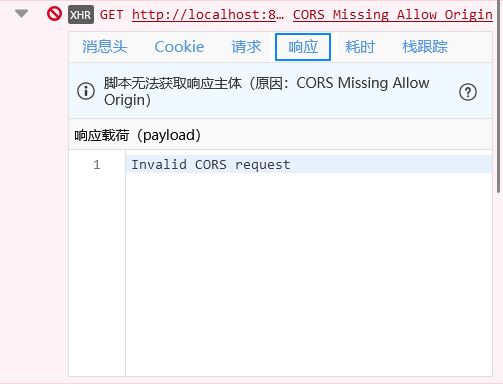
如何解决CORS问题
想要解决CORS可以分为两种思路:
- 响应域放行请求域
- 请求域代理响应域
响应域放行请求域
- 如果使用的是
Spring Web,因此只需要在配置了添加如下配置:
@Configuration
public class WebConfig implements WebMvcConfigurer {

    @Value("${server.baseUrl}")
    private String url;

    @Override
    public void addCorsMappings(CorsRegistry registry) {
        registry.addMapping("/**")
                .allowedOrigins(url) // 替换为你的前端地址
                .allowedMethods("GET", "POST", "PUT", "DELETE", "OPTIONS")
                .allowedHeaders("*")
                .allowCredentials(true);
    }

}
如果还是不行请尝试放行OPTIONS,axios会先发送这个请求的
if (Objects.equals(request.getMethod(), "OPTIONS")) return true;- 如果使用
nginx(不一定成功)
在生产环境中,你可以使用 Nginx 或 Apache 等反向代理服务器来转发请求。这些服务器可以配置为将特定路径的请求转发到后端 API 服务器。
例如,使用 Nginx,你可以在 nginx.conf 中添加如下配置:
nginxserver {
    listen 80;
    server_name yourdomain.com;

    location /api {
        proxy_pass http://backend-api-server.com;
    }

    location / {
        root /path/to/your/vite/build;
        try_files $uri $uri/ /index.html;
    }
}
在这个配置中,所有以 /api 开头的请求都会被转发到 http://backend-api-server.com,而其他请求则会由 Vite 构建的静态文件提供服务。
请求域代理响应域(临时解决)
这边使用vite+vue3的框架,在 vite.config.js 添加如下:
export default defineConfig({
  server: {
      '/api': {
        target: 'http://localhost:8081/',
        changeOrigin: true,
        rewrite: (path) => path.replace(/^\/api/, '')
      }
    }
  }
})
在 axios 发送请求的话就直接向 /api 发送请求即可
import axios from 'axios';
axios.get('/api')
.then(function (response) {
    // 处理成功情况
    console.log(response);
})
.catch(function (error) {
    // 处理错误情况
    console.log(error);
})
.then(function () {
    // 总是会执行
});
举报内容
评论