Claude Code 终于会"叫"了 —— 一个 10MB 小工具,让 AI 跑完任务发个声
写代码时挂着 Claude Code 跑活儿,结果你切去刷了会儿别的,回来发现它早就停在那里干等了 5 分钟……
这种"AI 写完不通知,你浪费时间盯着"的尴尬,估计每个 Claude Code 重度用户都遇到过。
今天分享一个我自己做的小工具:Claude Code 音效管理器。
一句话功能:让 Claude Code 在任务完成、等待输入、请求权限的时候,发出不同的提示音。
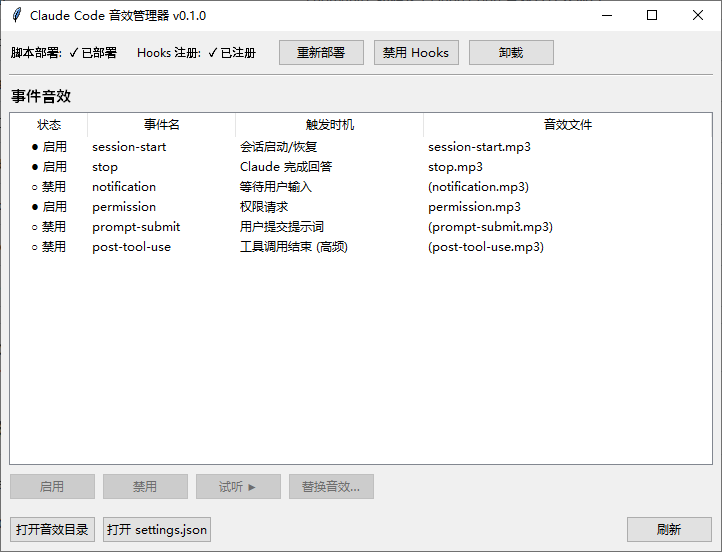
一、为什么要做这玩意
Claude Code 是个长任务工具。一次复杂的重构,跑个十几分钟很正常。
人不可能干瞪着等。但一旦你切走干别的事 ——
- 它写完了:你不知道,浪费时间
- 它要等你确认权限:你不知道,浪费时间
- 它问了个问题等你回答:你不知道,还是浪费时间
系统通知?默认基本没有,而且通知声都一样,分不清是"完成了"还是"卡住了"。
所以我想:能不能像 IDE 那样,不同事件配不同音效?
完成 = 清脆的"叮";等待输入 = 提示音;请求权限 = 警告音。耳朵听一下就知道该不该回去。
二、原理:薅 Claude Code 自带的 Hooks 机制
Claude Code 其实留了一个口子叫 Hooks,可以在特定事件发生时执行任意 shell 命令。
这个工具做的事很朴素:
- 在你电脑上放一个
play-sound.sh脚本 - 修改
~/.claude/settings.json,让 6 个事件分别调用这个脚本 - 脚本调系统 PowerShell 播放对应的音效文件
支持的 6 个事件:
| 事件 | 触发时机 | 推荐 |
|---|---|---|
session-start |
会话启动 | 可选 |
stop |
Claude 完成回答 | ⭐ 必开 |
notification |
等待用户输入 | ⭐ 必开 |
permission |
请求权限确认 | ⭐ 必开 |
prompt-submit |
你提交提示词 | 看心情 |
post-tool-use |
每次工具调用后 | 别开,太吵 |
{
 ......
  "hooks": {
    "SessionStart": [
      {
        "matcher": "startup|resume",
        "hooks": [
          {
            "type": "command",
            "command": "bash ~/.claude/scripts/play-sound.sh session-start"
          }
        ]
      }
    ],
    "Stop": [
      {
        "hooks": [
          {
            "type": "command",
            "command": "bash ~/.claude/scripts/play-sound.sh stop"
          }
        ]
      }
    ],
    "Notification": [
      {
        "matcher": "idle_prompt",
        "hooks": [
          {
            "type": "command",
            "command": "bash ~/.claude/scripts/play-sound.sh notification"
          }
        ]
      }
    ],
    "PermissionRequest": [
      {
        "hooks": [
          {
            "type": "command",
            "command": "bash ~/.claude/scripts/play-sound.sh permission"
          }
        ]
      }
    ],
    "UserPromptSubmit": [
      {
        "hooks": [
          {
            "type": "command",
            "command": "bash ~/.claude/scripts/play-sound.sh prompt-submit"
          }
        ]
      }
    ],
    "PostToolUse": [
      {
        "hooks": [
          {
            "type": "command",
            "command": "bash ~/.claude/scripts/play-sound.sh post-tool-use"
          }
        ]
      }
    ]
  }
}
配置:工具自动写入的 hooks 配置
三、为什么要包成 GUI?写个脚本不行吗?
行,但是体验差。
我自己一开始就是手写 hooks 配的。问题来了:
- 音效想换怎么办?翻目录、找文件、丢进去、重命名
- 某个事件太吵想临时关掉?开编辑器改 JSON
- 想听听换的音效什么效果?还得手动播放
- 设备换了重装一遍?又来一次
所以做了个 tkinter 写的小 GUI,把这些操作全做成按钮:
- 一键安装:脚本和默认音效自动到位,settings.json 自动注入
- 单事件开关:表格里点一下就能临时禁用某个事件(其实是把文件挪到
_disabled/目录) - 替换音效:选个本地音频文件,自动覆盖
- 试听:选中事件点试听,确认效果
- 彻底卸载:一键清理,可选保留音效目录

四、几个细节决策
为什么状态分两层(脚本部署 + Hooks 注册)?
因为有时候你只是想暂时静音,但不想把音效文件全删了。
所以分两层:
- "脚本和音效"是一层,部署一次基本不动
- "Hooks 注册"是另一层,可以随时启用/禁用
想全程静音 → 关掉 Hooks 注册即可,音效保留。
想换个项目重新部署 → 卸载 + 重装一气呵成。
为什么用 bash 而不是直接调 PowerShell?
Claude Code 的 hooks 在 Windows 上默认用 bash 解释器执行命令(依赖 Git Bash),所以脚本要写成 .sh,再在里面调 powershell.exe 播放音频。
绕了一圈,但兼容性最好。
为什么不用 pygame / playsound?
为了单文件 exe 尽量小。直接调系统 PowerShell 的 SoundPlayer / Windows Media Player COM 对象,零依赖。
打包出来 ClaudeSounds.exe 只有 10-15MB,双击就能跑。
五、自己跑一下
用户路径(推荐) :
下载 ClaudeSounds.exe(在 GitHub releases),双击 → 点「安装」 → 重启 Claude Code → 完事。
开发者路径:
# 跑源码
uv run python -m claude_sounds

# 打包成 exe
uv sync --group dev
build.bat
产物在 dist\ClaudeSounds.exe。
六、装完之后是种什么体验
挂着 Claude Code 让它做长任务,人可以放心去做别的。
- 听到"叮" → 它写完了,回来 review
- 听到"咚" → 它在等你输入
- 听到"嘀嘀" → 它要权限,得回去点 Yes
不需要盯屏幕,注意力可以真正放在别的事上。
对于每天用 Claude Code 几小时的人,这点反馈循环上的优化,省下来的等待时间一周下来不少。
七、技术栈一览(给同行看)
- GUI:tkinter(标准库自带,不引外部依赖)
- 打包:PyInstaller(onefile 模式)
- 包管理:uv
- 代码许可:MIT
- 默认音效:notificationsounds.com,CC-BY 协议
整个项目代码量很小,核心逻辑就 4 个 Python 文件:
claude_sounds/
├── gui.py        # tkinter UI
├── manager.py    # 事件状态管理
├── installer.py  # 部署 / 注册 hooks
└── paths.py # 路径工具适合作为「小型 Python 桌面工具 + Hook 类系统集成」的练手范例。
写在最后
这个工具解决的不是技术问题,是注意力问题。
AI 编程工具越强,人和 AI 之间的"交接节点"就越关键。每次交接你少花一点时间在"它好了没有"上,你的真实生产力就高一点。
如果你也是 Claude Code 重度用户,强烈建议试一下。
项目地址:zxbdzh/claude-sounds: claude hook触发音效设置
下载直接用:下载地址
觉得有用的话,点个在看 / 转发,让更多 Claude Code 用户少受点等待之苦。
有功能建议或 bug 反馈,欢迎在 GitHub Issues 留言,或公众号后台直接私信。
评论